
Production AI Assistant: AI Trainer
Discover how Content Tree's Production AI Assistant combines various AI-powered tools. This combination creates more realistic AI Trainers, enhances learner engagement, and streamlines modern e-learning production.
IN THIS ARTICLE
The Evolution of AI Trainers in E-Learning
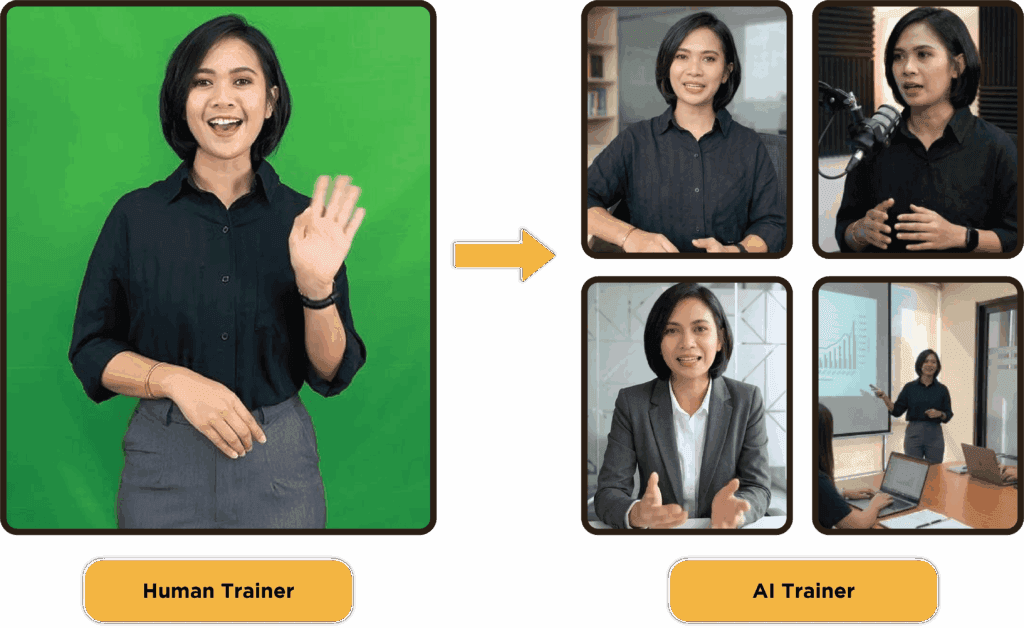
AI Trainers have evolved significantly beyond their initial role as simple digital presenters. The Production AI Assistant integrates multiple AI technologies into one cohesive workflow. This integration creates AI Trainers and AI Characters that are realistic, dynamic, and tailored for modern learning experiences.
A few years ago, AI Trainers primarily served as digital presenters. They could read scripts, perform lip-sync, and appear on screen, but their movements were limited. Most avatars maintained fixed poses with minimal facial expressions, resembling talking images rather than real instructors.
Today, learners demand a more natural experience. They frequently watch content on platforms like YouTube, LinkedIn Learning, and TikTok, where presenters move fluidly, use varied camera angles, and engage with their surroundings. To fulfill these expectations, Content Tree developed the Production AI Assistant workflow.
Instead of depending on a single AI platform, the Production AI Assistant merges several AI-powered production tools into one workflow. Each tool has a distinct function, from generating AI Trainers and Characters to creating A-Roll and B-Roll visuals, realistic movements, scene editing, voice quality enhancement, and complete video assembly.
Enhancing Flexibility in AI Video Production
The primary difference between previous-generation AI Trainers and the Production AI Assistant is flexibility.
In the past, generating an AI Trainer followed a linear workflow. The team uploaded a script, generated lip-sync, and placed the presenter into the course. Although this method worked for many projects, it limited expressions, gestures, visual hooks, and camera movements. Today, the Production AI Assistant goes beyond avatar generation; it constructs complete AI-powered video scenes.
This workflow can automatically assist with:
- AI Trainer generation
- Voice cloning
- Video planning
- Scene planning
- Script generation and refinement
- Camera angle selection
- A-Roll generation
- B-Roll generation
- Background enhancement
- Cinematic transitions
- Voice enhancement
- Animation refinement
Now, content can resemble modern social media videos or professional training productions, while also streamlining the storyboarding process.
As a result, the AI Trainer becomes significantly more engaging, natural, and relevant to learners.
Streamlining Video Production Processes
The process starts with a raw video recording of a presenter. Then, the Production AI Assistant transforms this recording into a realistic AI Trainer, cloning the presenter’s voice for natural delivery.
Depending on project requirements, the workflow can take two paths. For rapid content production, the system automatically generates a Video Plan with proposed scenes, narration, A-Roll, and B-Roll. This option suits fast production without supporting reference images or an existing storyboard.
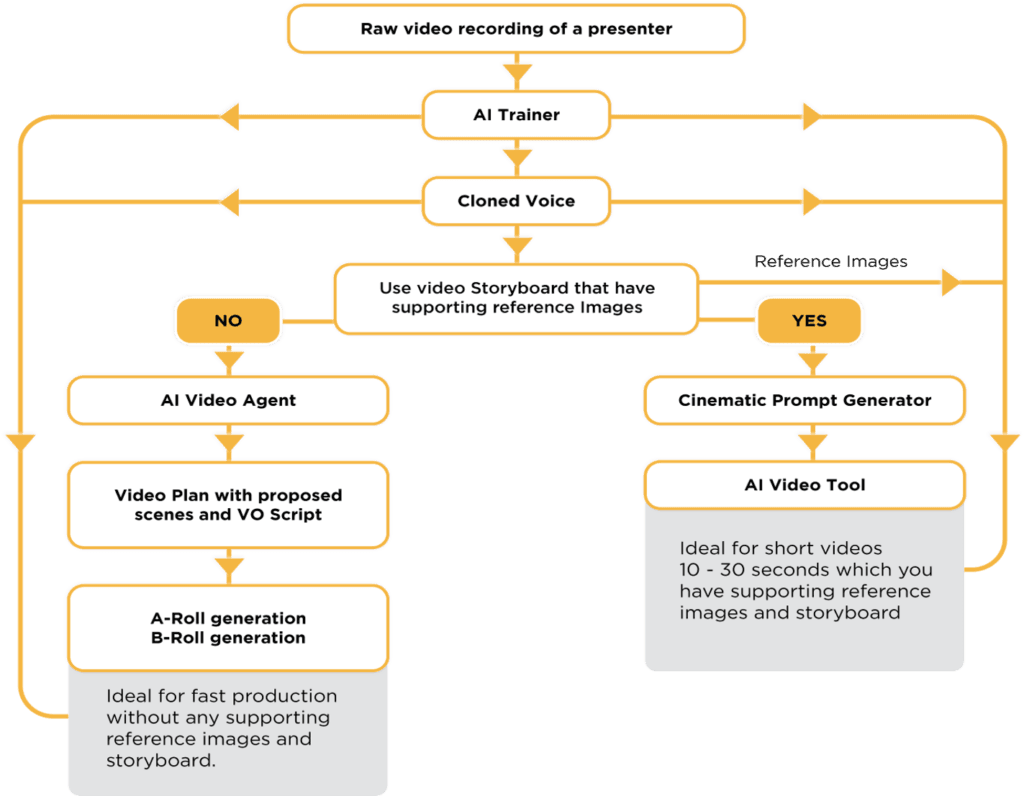
For projects with a storyboard and supporting reference images, the Cinematic Prompt Generator workflow utilizes these assets to create polished AI-generated video scenes with enhanced visual control. This method works best for short videos of 10 to 30 seconds when visual references and a storyboard are available.
Throughout the process, the production team can refine scripts, regenerate scenes, replace B-Roll footage, enhance animations, improve voice quality, and make creative adjustments before assembling all elements into the final learning video.
Instead of juggling multiple disconnected production tools, the team manages the entire workflow through an AI-assisted production pipeline. This method speeds up development and ensures consistent, high-quality learning experiences at scale.
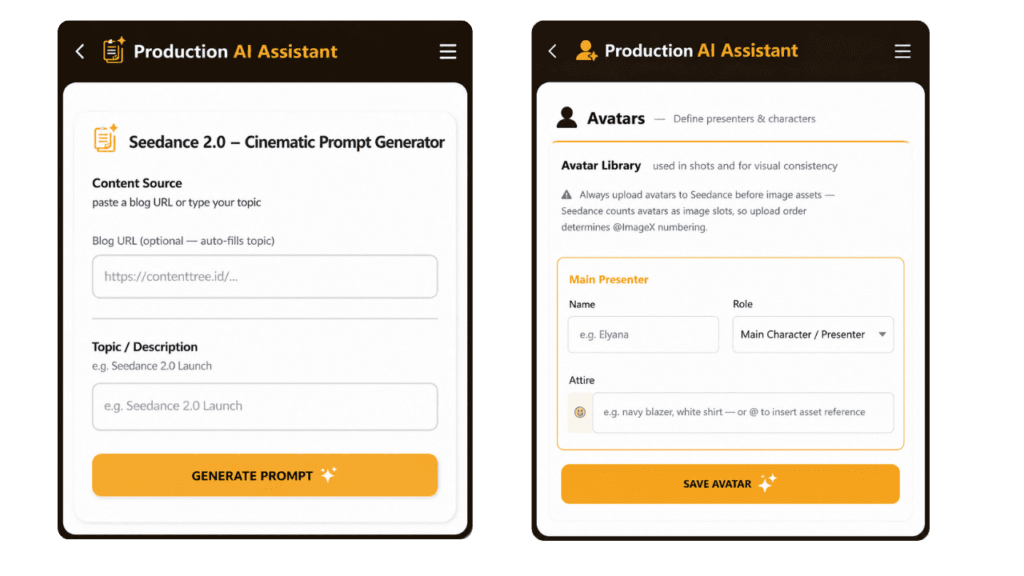
Cinematic Prompt Generator Screens:
The Importance of Visual Context in Learning
Combining A-Roll and B-Roll effectively maintains learner attention and enhances content understanding.
Traditional e-learning videos often feature an AI presenter speaking continuously on screen. While this can be effective, learners may lose focus when the visual presentation remains unchanged.
The Production AI Assistant allows the team to integrate A-Roll and B-Roll, a technique commonly used in professional video production.
A-Roll refers to the main presenter or AI Trainer delivering the lesson, while B-Roll includes supporting visuals such as animations, interface demonstrations, illustrations, diagrams, workplace footage, or cinematic scenes that reinforce the presenter’s explanation.
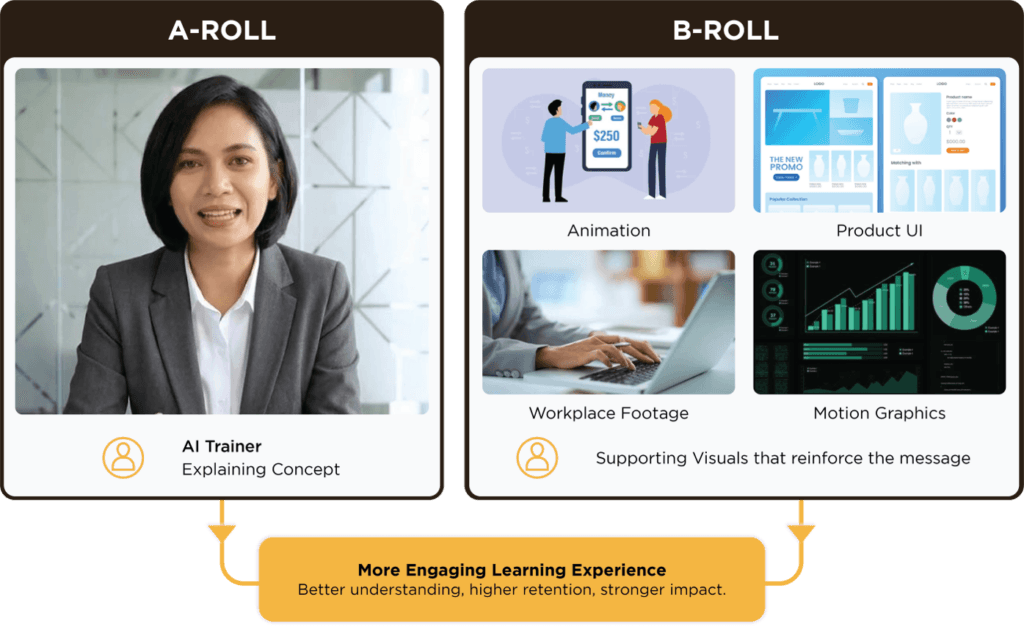
By automatically planning and generating these supporting visuals, learners receive visual context precisely when needed. Consequently, the content becomes more dynamic, easier to understand, and aligns better with modern online learning platforms.
Advancements in AI Learning Technologies
The Production AI Assistant transcends being just another AI tool. It embodies a new production methodology that integrates multiple AI technologies into one creative workflow.
As AI evolves, Content Tree will expand this workflow with improved animation, smarter scene generation, more natural AI Trainers, and richer interactive learning experiences.
Ultimately, the Production AI Assistant aims not only to accelerate development but also to help organizations create modern e-learning that engages learners and delivers superior learning outcomes.
FAQ
What is a Production AI Assistant?
A Production AI Assistant is an AI-powered production workflow that combines multiple AI tools into a single process for creating AI Trainers, AI Characters, videos, voice cloning, scene planning, A-Roll, B-Roll, and cinematic learning content. Instead of relying on one AI platform, it streamlines the entire e-learning video production process.
How is the Production AI Assistant different from a traditional AI Trainer?
Traditional AI Trainers primarily focus on lip-syncing and presenting scripted content. The Production AI Assistant goes much further by assisting with scene planning, camera angles, realistic movements, AI Character creation, voice enhancement, cinematic editing, and supporting visuals, producing learning videos that feel more natural and engaging.
What are A-Roll and B-Roll in e-learning?
A-Roll refers to the main presenter or AI Trainer delivering the lesson. B-Roll consists of supporting visuals such as animations, software interfaces, workplace footage, diagrams, and motion graphics that reinforce the content. Combining both creates a more engaging learning experience and improves learner understanding.
Can the Production AI Assistant generate videos from an existing storyboard?
Yes. If a storyboard and reference images are already available, the Cinematic Prompt Generator uses those creative assets to generate AI-powered video scenes with greater visual consistency and creative control.
What are the benefits of using AI Trainers in e-learning?
AI Trainers provide consistent delivery, reduce production time, simplify content updates, and create more engaging learning experiences. When combined with AI-powered production workflows, they can also produce professional-quality training videos at scale.
Can Content Tree customise AI Trainers for different organisations?
Yes. Content Tree develops customised AI Trainers and AI Characters based on each organisation’s branding, learning objectives, and visual style, ensuring every e-learning programme delivers a consistent learner experience.