
Storyboard AI Assistant - Naration Agent
Learn how the Storyboard AI Assistant empowers e-learning professionals to create superior storyboards. It optimizes voiceovers, on-screen text, and duration analysis using AI.
IN THIS ARTICLE
- Storyboard AI Assistant: Improving Voiceovers, On-Screen Text, and Storyboard Quality with AI
- Supporting the Storyboarding Process
- Improving Voiceover Scripts with AI
- Improving On-Screen Text
- Replacing Translated Content More Efficiently
- Word Count and Course Duration Estimation
- Why This Helps E-Learning Professionals
- AI as a Support Tool, Not a Replacement
- Looking Ahead
Storyboard AI Assistant: Improving Voiceovers, On-Screen Text, and Storyboard Quality with AI
In e-learning development, storyboards serve as crucial production documents. They guide course structure, content flow, narration, on-screen text, and visual direction for each slide.
However, storyboarding can be time-consuming. Instructional designers must review voiceover scripts, check spelling and grammar, manage on-screen text, monitor word count, estimate course duration, and prepare content for translation.
When multiple projects run simultaneously, these tasks can become repetitive and challenging to manage. Therefore, Content Tree developed Storyboard AI Assistant, an internal tool that helps e-learning professionals enhance storyboard quality and minimize manual work during course development.
Supporting the Storyboarding Process
Storyboard AI Assistant works alongside existing PowerPoint storyboards.
The process is straightforward. The instructional designer opens the storyboard and the Storyboard AI Assistant side by side. Then, the tool reads the storyboard content and organizes it by topic and slide number.
Once the content loads, users can review and enhance voiceover scripts and on-screen text directly through the tool. This approach reduces the need for manual copying and pasting between documents.
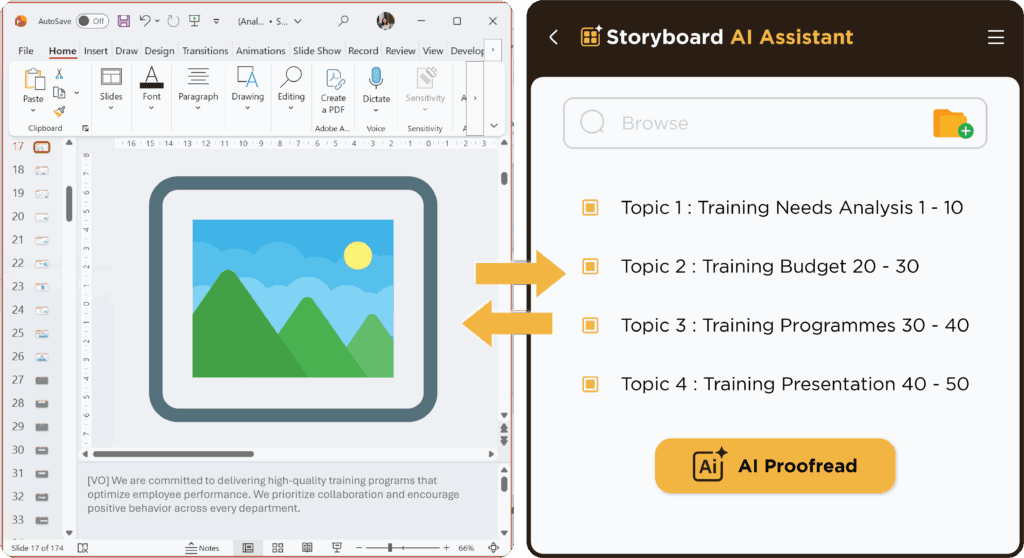
When an improved version is ready, it can be updated back into the storyboard with a single click.
From a workflow point of view, this helps make the review process faster, cleaner, and easier to control.
Improving Voiceover Scripts with AI
Voiceover scripts must remain clear, natural, and accurate. Even minor spelling, grammar, or punctuation errors can impact the professionalism of an e-learning module.
Storyboard AI Assistant assists instructional designers in proofreading voiceover scripts using AI. Users can select the topic or slide range for review and then utilize the AI Proofread function to analyze the content.
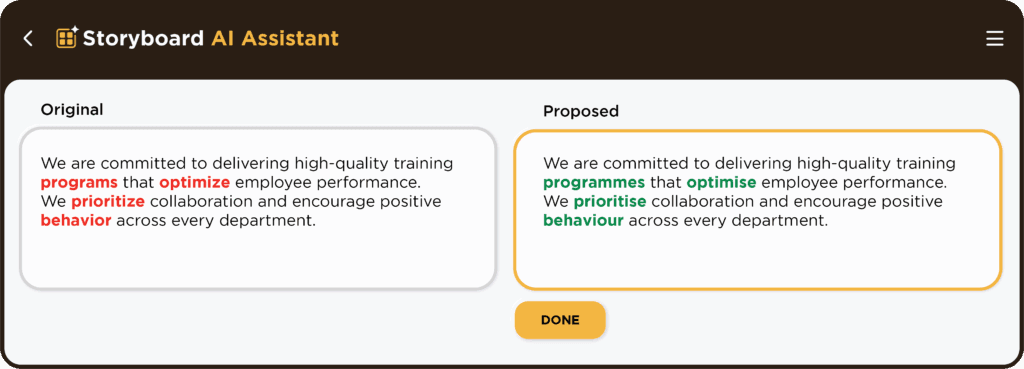
The tool suggests improvements for common issues, including spelling mistakes by identifying the usage of US English versus UK English. The AI Storyboard Assistant displays AI-powered proofreading suggestions for voiceovers and on-screen text.
Spelling Mistakes (identifying the usage of US English vs UK English)
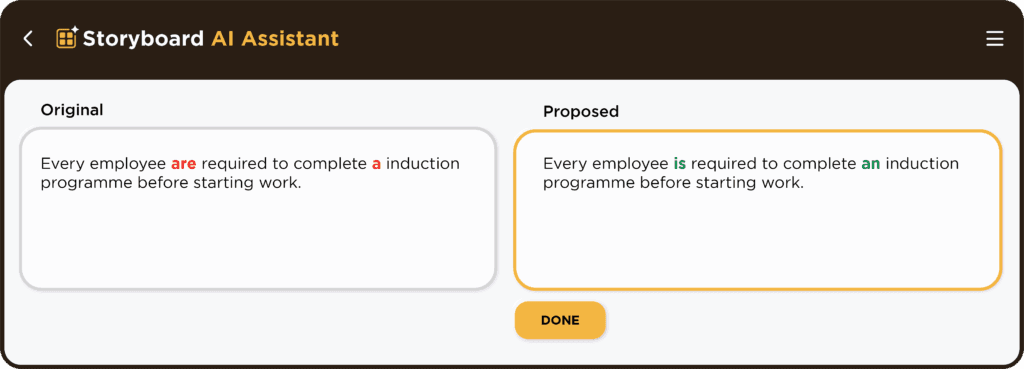
Grammar Issues
Punctuation Errors
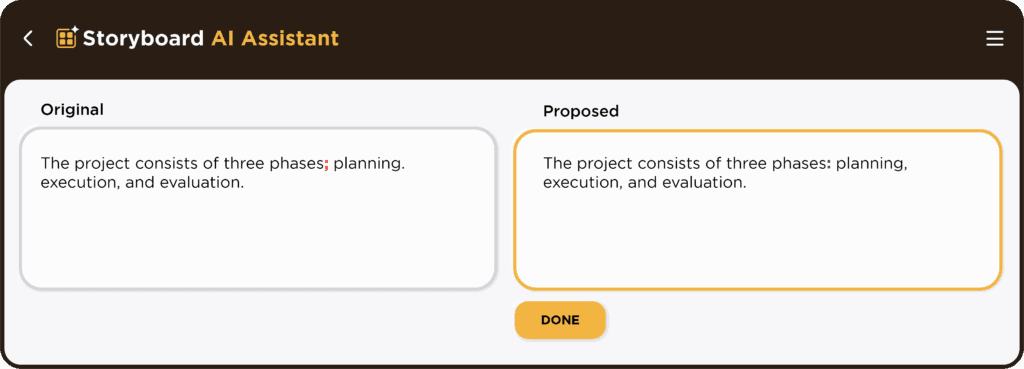
Syntax (improving sentence structure)
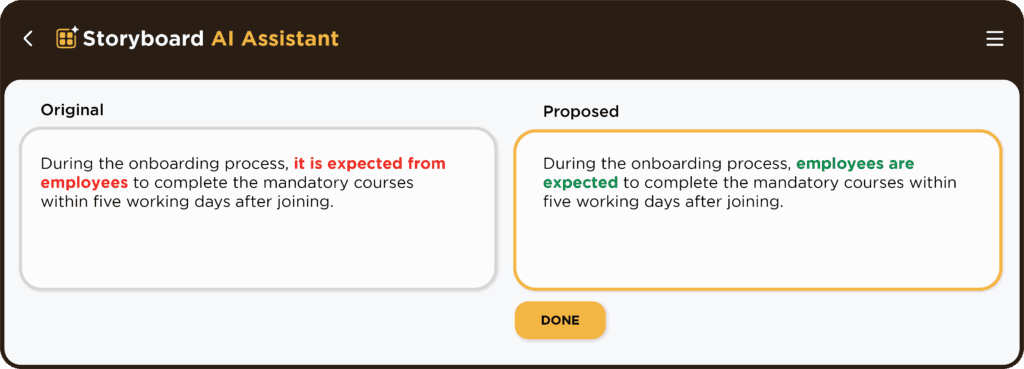
Improving On-Screen Text
On-screen text plays an important role in guiding learners through the module. It needs to be concise, accurate, and aligned with the voiceover.
Storyboard AI Assistant can also review and improve on-screen text. This is useful when the text on the slide needs to be shortened, corrected, or rewritten for better clarity.
For e-learning developers, this helps maintain consistency between what learners read on screen and what they hear in the narration.
It also supports better quality control before the storyboard moves into visual design, animation, or final development.
Replacing Translated Content More Efficiently
Managing translated content presents a common challenge in e-learning production.
In multilingual projects, instructional designers often need to replace existing voiceover scripts and on-screen text with translated versions. Manually doing this across numerous slides can be time-consuming and may result in copy-and-paste errors.
Storyboard AI Assistant simplifies this process.
The tool exports all voiceover scripts and on-screen text from a PowerPoint storyboard into a Word document for translation. Once users prepare the translated content, they can upload the file back into Storyboard AI Assistant.
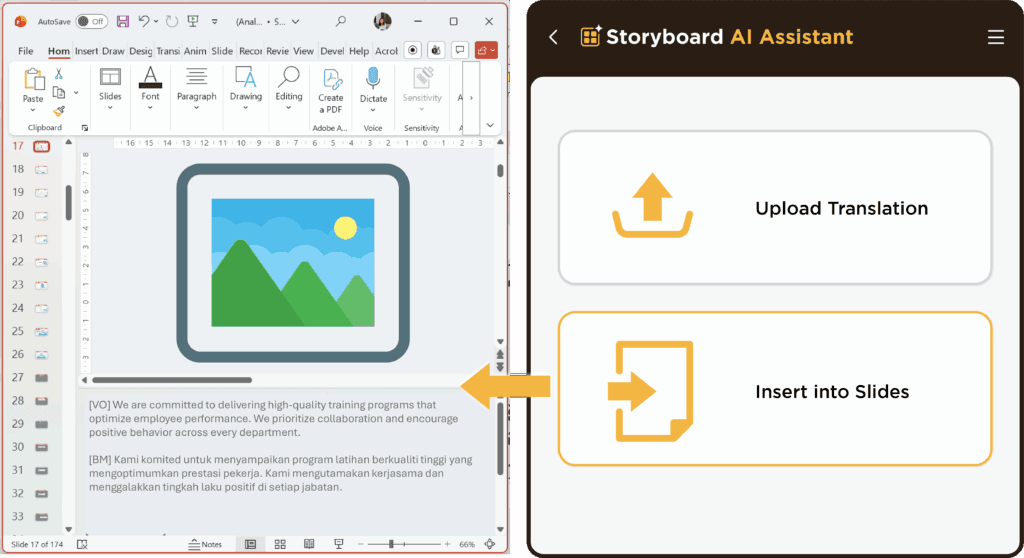
The tool then automatically replaces the existing voiceover and on-screen text in the storyboard.
This approach reduces manual work and streamlines multilingual storyboard updates.
Word Count and Course Duration Estimation
E-learning courses typically have a target duration. A module may need completion within 10 minutes, 20 minutes, or a specific duration agreed upon with the client.
To facilitate this, instructional designers must determine whether the voiceover script is too short, too long, or aligned with the expected learning duration.
Storyboard AI Assistant calculates the word count and estimated duration once the storyboard content loads.
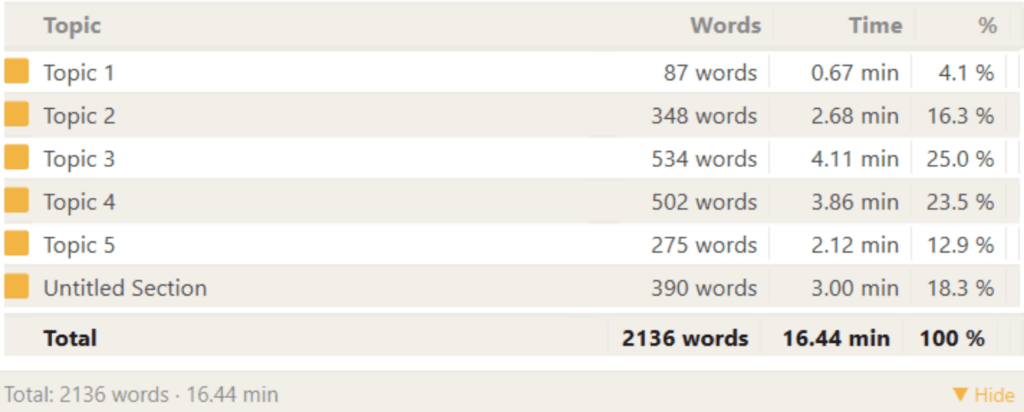
This feature provides the development team with immediate visibility into course length. If the estimated duration exceeds expectations, the team can shorten the narration or eliminate unnecessary content early in the process.
This approach helps prevent issues during recording, animation, or development.
Why This Helps E-Learning Professionals
Storyboard AI Assistant enhances the storyboarding workflow by minimizing repetitive manual tasks.
Instead of manually checking every script, copying and pasting translated text slide by slide, or estimating duration separately, instructional designers can efficiently manage these tasks from a single tool.
The tool helps teams:
- Proofread voiceover scripts
- Improve on-screen text
- Maintain language consistency
- Replace translated content more efficiently
- Analyse word count
- Estimate course duration
- Reduce manual copy-and-paste work
- Improve storyboard quality before development begins
Consequently, this approach enables instructional designers to spend less time on repetitive production checks and more time enhancing the learning experience.
AI as a Support Tool, Not a Replacement
Although AI enhances speed and accuracy, human judgment remains crucial.
Instructional designers must still determine whether the content aligns with learning objectives, whether the tone suits the audience, and whether the storyboard effectively delivers the intended learning experience.
Storyboard AI Assistant aids this process by managing repetitive checks and assisting with content improvement. Ultimately, the final decision rests with the learning professionals.
Looking Ahead
Storyboard AI Assistant represents Content Tree’s commitment to making e-learning development more efficient and scalable.
In this article, we explored how the tool facilitates proofreading, enhances on-screen text, replaces translated content, analyzes word count, and estimates duration.
These features improve quality control while accelerating the storyboarding process.
Additionally, Storyboard AI Assistant includes an Illustration Agent that generates images and illustrations based on storyboard content. This feature supports another vital aspect of e-learning development: creating appropriate visuals for learning materials.
By integrating AI support with instructional design expertise, Content Tree strives to deliver not only faster content but also improved learning experiences for organizations and learners.
FAQ
What is Storyboard AI Assistant?
Storyboard AI Assistant is an internal tool developed by Content Tree to support e-learning storyboard development. It helps improve voiceovers, on-screen text, translations, word count analysis, and course duration estimation.
How does Storyboard AI Assistant work with a storyboard?
The tool reads content from an existing PowerPoint storyboard and organises it by topic and slide number. Users can then review, improve, and update the content back into the storyboard.
Can Storyboard AI Assistant proofread voiceover scripts?
Yes. It can help identify spelling mistakes, grammar issues, punctuation errors, sentence structure problems, and language style inconsistencies.
Can it improve on-screen text?
Yes. The tool can help review and improve on-screen text so it is clearer, more concise, and better aligned with the narration.
Can it help with translated content?
Yes. Voiceover scripts and on-screen text can be exported into a Word document for translation. Once translated, the file can be uploaded back into the tool to replace the existing content in the storyboard.
Can it estimate course duration?
Yes. Storyboard AI Assistant can calculate word count and estimate course duration based on the storyboard content.
Does AI replace instructional designers?
No. AI supports the process by reducing repetitive work, but instructional designers still make the final decisions about learning objectives, content quality, tone, and learner experience.